For those who have checked their Chatham University emails recently, a new development may have stuck out: the Graymail folder. Graymail is part of an email security tool called KnowBe4 Defend that Chatham purchased earlier this fall, with the goal of additional cybersecurity for Outlook email users.
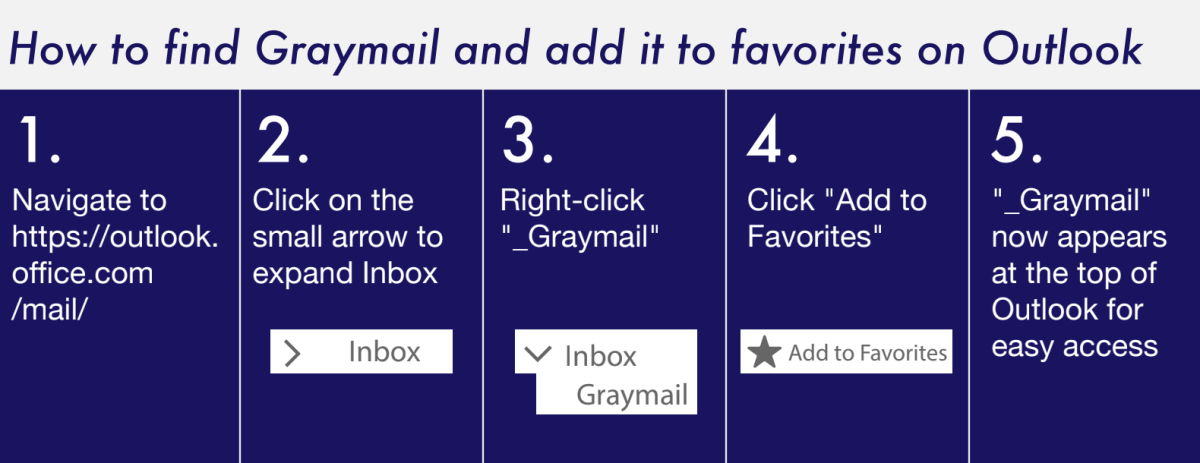
According to KnowBe4’s website, Defend uses behavioral Artificial Intelligence (AI) to detect potentially malicious emails and sort them into different folders. One of these folders is called Graymail, which is located within the inbox. The Graymail folder is found on the left side of the Outlook home page in a drop-down menu in between “inbox” and “archive.”
“Graymail is defined as nonmalicious, bulk email from legitimate sources, such as newsletters, announcements or advertisements, to which a user may have previously opted in,” Director of Infrastructure and Security for IT Brian Chappie said in an email interview.
This differs from junk mail, which is often unsolicited and sometimes malicious. Chappie said the increased amount of phishing emails – fraudulent messages that intend to convince users to reveal personal information such as passwords or bank account details – in Chatham inboxes is a result of people clicking on links in emails, which alerts spammers that the accounts are active.
“It’s impossible to prevent scam emails entirely, but products like KnowBe4 Defend and Microsoft Defender help to minimize them,” Chappie said.
It’s important, though, to double check the Graymail folder to ensure that legitimate emails are not overlooked.
Charlie Dorlon ‘25 said an important acceptance email ended up in the Graymail folder instead of their inbox.
“A friend of mine, who applied for the same conference, let me know that acceptances [and] rejections were out,” Dorlon said. “I had to manually search my inbox for it, which was very frustrating, especially because there’s a registration deadline for the conference. If my friend hadn’t let me know, I might not have seen it in time.”
Elijah Russell ‘27 also had a similar experience with Graymail, with an important email being sent to the folder.
“Now it’s just kind of a stressful thing because I don’t know how to actually find my Graymail inbox to check what is being sent there,” Russell said.
For quick access, Chappie recommends that people pin the Graymail folder as a “favorite” in their Outlook inboxes. The Chatham community can alos prevent emails from specific senders from going to their Graymail folder in the future by opening those emails and clicking on the words “trust sender.”
“This makes it easy to see and manage,” Chappie said.
For questions, issues or to report spam emails, people can contact IT Support Services at 412-365- 1112 or submit an IT ticket online through services.Chatham.edu.